
High Availability with Keepalived on RHEL, Rocky Linux, and AlmaLinux
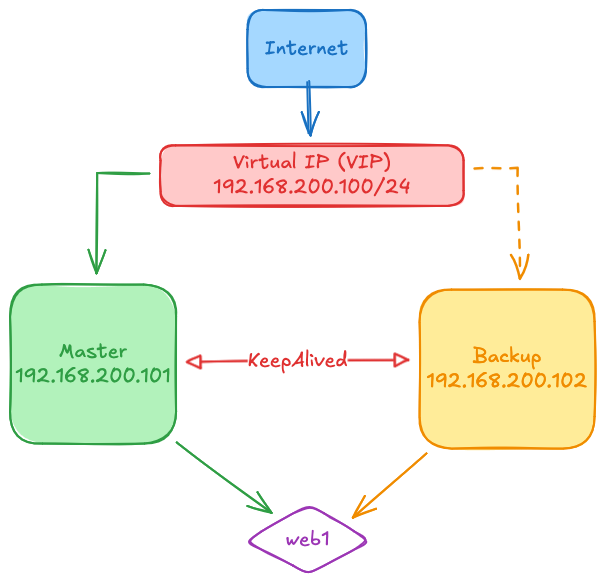
Keepalived provides simple and robust facilities for load-balancing and high-availability. The load-balancing framework relies on the well-known and widely used Linux Virtual Server (IPVS) kernel module providing Layer4 load-balancing. Keepalived implements a set of checkers to dynamically and adaptively maintain and manage a load-balanced server pool according to their health. Keepalived also implements the VRRPv2 and VRRPv3 protocols to achieve high-availability with director failover [1].
Prerequisites
- Skills: Basic Linux administration.
- Operating System: RHEL, Rocky Linux, or AlmaLinux.
- Servers: 2x Nodes on the same subnet.
- Network: 1x Virtual IP (VIP) for the cluster.
Keepalived installation
Keepalived is available in the standard system repository, so the installation is straightforward. Execute the following command on both servers:
dnf install keepalived
Keepalived configuration
Default configuration is located in /etc/keepalived/keepalived.conf and it's a good starting point. For this tutorial, we will rename it to keepalived.conf.orig and create a basic VRRP configuration (shared IP address).
In this tutorial:
- Master Server IP: 192.168.200.101
- Backup Server IP: 192.168.200.102
- Virtual IP (VIP): 192.168.200.100
Interface Verification
Before configuring Keepalived, identify your network interface name (e.g., eth0, ens18, or eno1).
ip link show
Ensure the interface line in the configuration matches your actual interface name.
Configuration Setup
Rename the default configuration file on both nodes:
mv /etc/keepalived/keepalived.conf{,.orig}
Create a new configuration file /etc/keepalived/keepalived.conf with the following content:
Master Server configuration:
! Configuration File for keepalived
vrrp_instance VI_1 {
    state MASTER
    interface eth0
    virtual_router_id 51
    priority 100
    advert_int 1
    authentication {
        auth_type PASS
        auth_pass 1111
    }
    virtual_ipaddress {
        192.168.200.100
    }
}
Backup Server configuration:
! Configuration File for keepalived
vrrp_instance VI_1 {
    state BACKUP
    interface eth0
    virtual_router_id 51
    priority 50
    advert_int 1
    authentication {
        auth_type PASS
        auth_pass 1111
    }
    virtual_ipaddress {
        192.168.200.100
    }
}
Configuration Parameters:
| Parameter | Description |
|---|---|
state |
Defines the initial role: MASTER or BACKUP |
interface |
Network interface name where VRRP runs |
virtual_router_id |
Unique VRRP group identifier (0-255); must match on both nodes |
priority |
Priority - higher value wins (0-255); Master should be higher than Backup |
advert_int |
Advertisement interval in seconds; lower values detect failures faster |
auth_type |
Authentication method: PASS (simple) or AH (encrypted) |
auth_pass |
Shared password for VRRP authentication (max 8 characters for PASS) |
virtual_ipaddress |
VIP to be managed by the VRRP instance |
Firewall Configuration
If you are running firewalld, you must allow VRRP traffic to pass between the Keepalived nodes:
firewall-cmd --add-rich-rule='rule protocol value="vrrp" accept' --permanent
firewall-cmd --reload
Starting and Checking Keepalived
Enable and start the service on both servers:
systemctl enable --now keepalived
Verifying the Virtual IP
Check if the VIP is assigned to the interface on the Master node:
ip addr show eth0
You should see the 192.168.200.100 address in the output of the Master server, but NOT on the Backup server (until a failure occurs).
Testing Failover
To test high availability, stop the Keepalived service on the Master node:
systemctl stop keepalived
Then, check the Backup node:
ip addr show eth0
The VIP (192.168.200.100) should now be visible on the Backup node. Starting Keepalived back on the Master node will cause the VIP to "fail back" because the Master has a higher priority (100 vs 50).
Troubleshooting
Both nodes have the VIP (Split-Brain)
If both nodes show the VIP in ip addr show, they cannot communicate with each other over VRRP.
- Check Firewall: Ensure the VRRP protocol is allowed on both nodes.
- Check Multicast: VRRP uses multicast (
224.0.0.18). Ensure your network/vSwitch supports multicast traffic. - Mismatched ID: Ensure
virtual_router_idis the same on both.
No node has the VIP
- Check Service Status: Run
systemctl status keepalived. - Check Logs: Inspect logs for errors:
journalctl -u keepalived. - Interface Name: Double-check that
interface eth0matches the output ofip link.
VIP doesn't fail back
- Check Priorities: The Master must have a higher
prioritythan the Backup. - Preemption: By default, Keepalived uses preemption. If you added
nopreempt, the Master won't take the VIP back automatically.